
Exporting data from the management system

Our management system makes it easy to export your data to other applications. Here is an overview of the options, followed by an explanation of how a system user can create an export.
Export methods
Applications import data in different ways, so exports are available in several formats. An export will not always match an application’s import requirements perfectly. A seamless connection often needs custom development. We can build an integration for your chosen application: contact us for tailored advice.
The system also includes the following standard export options. Once configured correctly, they are ready to use.
CSV export
CSV is a familiar way to export basic data. It stands for comma-separated values: each value is separated by a comma in the file. For example:
male,Jan,Janssen,Kerkstraat,24CSV is one of the oldest export formats and can be imported by many applications, including Excel.
PDF export
PDF is not generally suitable for importing into another application, but it is very useful for presentations or printed documents for a meeting. We discuss PDF export in our article on printing price cards. That example covers a price card, but you can also print selected data, such as a list of product prices.
XML export
XML, or Extensible Markup Language, is a more complex but more structured export format. The receiving application often requires a very specific structure. XML data can look like this:
<person>
  <gender>male</gender>
  <first_name>Jan</first_name>
  <last_name>Janssen</last_name>
  <address>
    <street>Kerkstraat</street>
    <house_number>24</house_number>
  </address>
</person>
Excel can read this data too. Although the code looks less simple, its structure makes it more useful in many situations.
JSON export
JSON exports are less commonly used here but perform well when handling large amounts of data. JSON stands for JavaScript Object Notation. It can look like this:
[
  {
    "gender": "male",
    "first_name": "Jan",
    "last_name": "Janssen",
    "address": [{ "street": "Kerkstraat", "house_number": "24" }]
  }
]
JSON offers fewer structural options than XML but is usually sufficient for data export. As the example shows, it can be less convenient for people to read, and is mainly intended for direct communication between applications.
Using an export
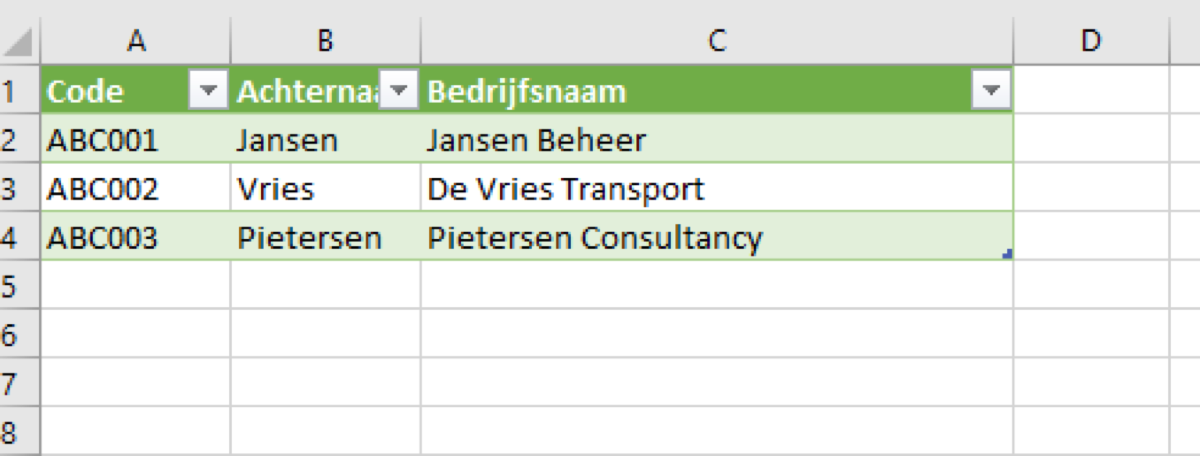
After choosing and correctly configuring an export, you can export data as often as needed. We can configure it for you. In this example, the export contains a customer list with customer numbers and names.
Open the people section and the “Clients” category. A CSV export button appears at the top right. Click it to download all customers in the category. For a more specific export, select individual people in the list before clicking the button.
Opening the exported file in Excel produces a result like this:
Exporting data can be very simple, but the structure required for importing it depends on the receiving application.